
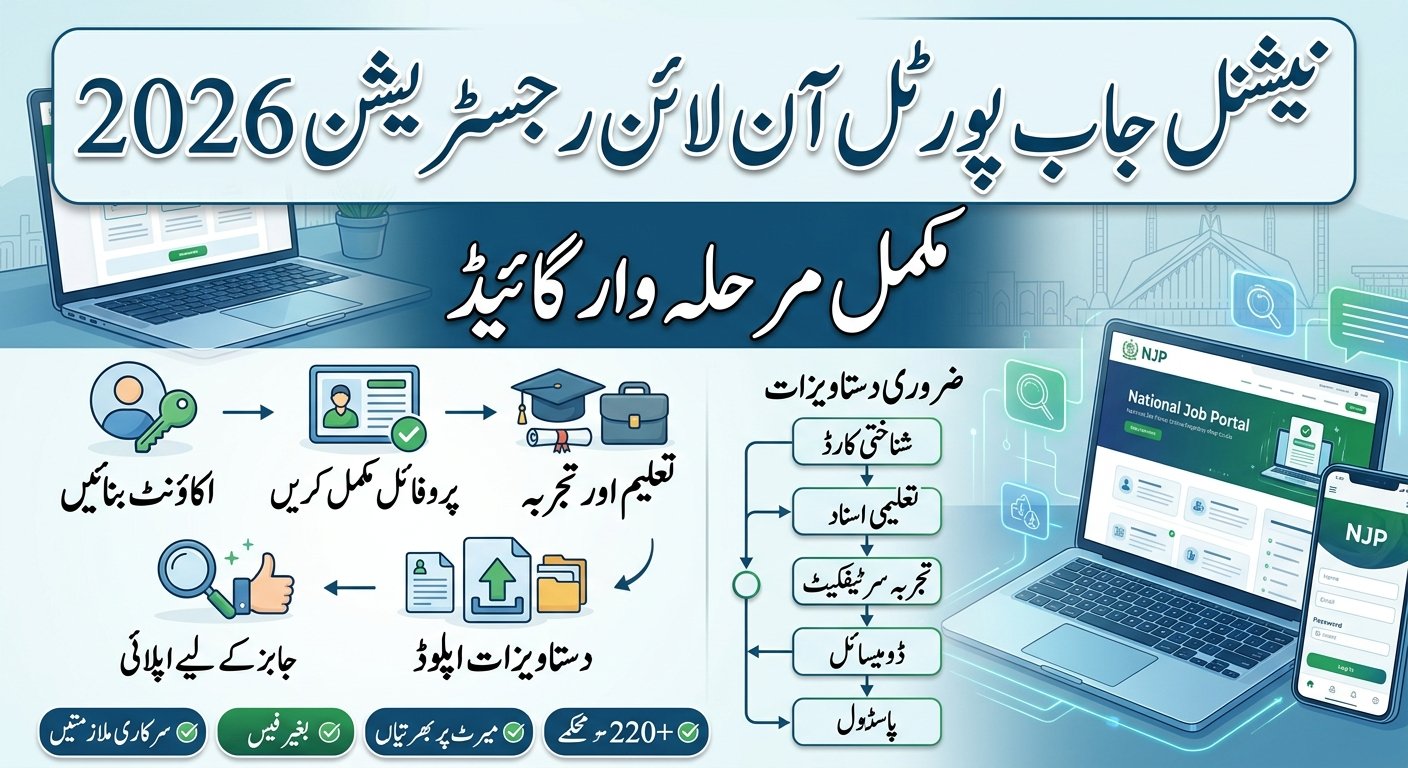
National Job Portal Online Registration 2026
For citizens and job seekers across Pakistan aiming to secure a stable career within federal ministries or autonomous public organizations, navigating the National Job Portal Online Registration 2026 process is an indispensable milestone. Managed officially under the government of Pakistan via njp.gov.pk, this centralized digital recruitment engine connects more than 2.2 million users to over 230 verified state departments, eliminating traditional paper application systems. Catering comprehensively to opportunities stretching from Basic Pay Scale (BPS-01 to BPS-22) up to specialized Pay Performance Scales (PPS), the modernized 2026 portal features real-time identity validation and a global database framework. Instead of requiring static file uploads for each separate opening, the dynamic system leverages a single automated master profile to cross-reference an applicant’s age, academic record, and regional domicile allocation against incoming jobs. Because a singular typographical discrepancy between your CNIC credentials and Higher Education Commission (HEC) transcripts can lead to an instant automated rejection, executing your registration flawlessly is critical to passing early screenings. This definitive candidate guide provides a comprehensive walkthrough to setting up your portal account, compressing required certificates, mapping out biographical details chronologically, utilizing the new one-click application feature, and tracking your real-time shortlisting status.
Inside the NJP Platform: Digital Public Sector Recruitment in Pakistan
The National Job Portal (NJP) is the official digital recruitment gateway operated under the federal government of Pakistan. Designed to guarantee merit-based recruitment, NJP aggregates vacancies ranging from Basic Pay Scale (BPS-01 to BPS-22) and Pay Performance Scales (PPS) across hundreds of federal institutions.
Hiring Departments Connected to NJP
- Ministries & Departments: Executive offices, central secretariats, and federal ministries.
- Directorships & Commissions: Regulatory bodies, public service divisions, and specialized directorates.
- Autonomous State Bodies: Public corporations, research institutions, and state-funded entities.
What makes the 2026 portal updates different?
Recent structural updates to the portal have integrated real-time identity validation and dynamic profile scoring. Unlike earlier iterations where candidates had to upload static PDF CVs for every opening, the 2026 platform relies on a structured database model.
Once your master profile is filled out, the system automatically matches your qualifications, age, and domicile against incoming openings. One-click applications are now possible across multiple departments without re-entering your biographical information.
Which departments hire through NJP?
Virtually all key federal entities advertise their vacancies on njp.gov.pk. Common employers actively recruiting on the portal include:
- Ministry of National Health Services, Regulations & Coordination
- Engineering Development Board
- National Accountability Bureau (NAB regional offices)
- National Telecommunication and Information Security Board (NTISB)
- Pakistan National Shipping Corporation (PNSC)
- Ignite – National Technology Fund
Preparation Checklist: Mandatory Credentials & File Upload Guidelines
Having your credentials properly organized before starting your NJP online registration 2026 prevents session timeouts and ensures error-free submission.
Mandatory Personal & Educational Documents
- Computerized National Identity Card (CNIC): Valid 13-digit CNIC number without dashes.
- Active Mobile Number: Must be registered in your own name to receive SMS OTP verifications.
- Functional Email Address: Used for login authentication and official test/interview calls.
- Academic Transcripts & Degrees: Matriculation/SSC, Intermediate/HSSC, Bachelor’s, and Master’s certificates with precise scoring (CGPA or percentage).
- Experience Certificates: Specific start and end dates for all previous public or private sector positions.
- Domicile Certificate: Explicit mention of district and province (e.g., Punjab, Sindh Rural/Urban, KPK, Balochistan, AJK, GB).
Formatting and File Upload Specifications
When uploading scanned files, adhere to these technical standards to avoid automated processing errors:
| Document Type | Supported Format | Maximum File Size | Key Requirements |
| Profile Photograph | JPEG / JPG / PNG | 2 MB | Formal headshot, light background, clear view |
| CNIC (Front & Back) | JPG / PNG / PDF | 2 MB | Clear scan, uncropped borders, legible text |
| Degree Certificates | PDF / JPG | 2 MB | HEC-recognized degrees or board certificates |
| Experience Letters | PDF / JPG | 2 MB | Official letterhead with employer contact info |
Phase-by-Phase Walkthrough to Creating Your Master NJP Profile
Follow these sequential steps to establish your applicant profile on the portal.
1.Account Creation and Sign Up:Establishes your primary identity on njp.gov.pk.
Navigate to njp.gov.pk and click on Sign Up or Register in the top navigation bar. Select Candidate Signup as your account type. Enter your valid 13-digit CNIC number, functional email address, and desired password. Double-check that your email is spelled correctly, as verification links are generated instantly.
2.Email & Mobile OTP Verification:Secures your portal communication channel.
After submitting the signup form, check your email inbox (and spam folder) for a verification link sent by the portal. Click the link to verify your email. Next, log into your account and complete the mobile number verification via the One-Time Password (OTP) sent to your registered cell phone.
3.Personal & Biographical Details:Forms the foundation of your eligibility verification.
Log into your dashboard and navigate to the My Profile tab. Fill out your full name exactly as printed on your CNIC. Enter your father’s/husband’s name, date of birth, gender, marital status, and religion. Select your official domicile province and district accurately—this directly governs quota-based hiring eligibility.
4.Educational Qualifications Mapping:Add degrees in chronological order from highest to lowest.
Click on the Education tab within your profile. Add your highest degree first (e.g., Master’s or Bachelor’s), followed by intermediate and matriculation certificates. Fill in the degree title, institute/board name, passing year, total marks/CGPA, and obtained marks/CGPA. Ensure CGPA conversions strictly follow Higher Education Commission (HEC) guidelines.
5.Work Experience & Skill Set Matrix:Detailed entry for professional history.
Under the Experience tab, enter all past and present employment details. Specify the organization name, position title, employment status (contract, regular, private), start date, and end date. If you are currently employed, mark the “Currently Working Here” checkbox. Add key technical skills and certifications relevant to your target job role.
6.Document Upload & Profile Lock:Finalize and verify profile completeness.
Upload your fresh passport-sized picture and scanned copy of your CNIC. Review all entered data thoroughly across every section. Click Save & Complete Profile. Ensure your profile completion status indicator displays 100% before searching or applying for active job postings.
Advanced Search Optimization: Filtering & One-Click Job Applications
Creating your profile is only half the battle; knowing how to navigate active job listings guarantees you won’t miss fast-approaching deadlines.
Filtering Vacancies by Scale, Ministry, and Location
The NJP job search interface offers multi-variable filtering options:
- By Job Scale: Search specifically for BPS positions (BPS-01 to BPS-22) or PPS contract positions (PPS-1 through PPS-11).
- By Field of Experience: Select categories like Software Engineering, Healthcare, Finance, Administration, or Legal.
- By Location: Filter by specific hubs such as Islamabad, Lahore, Karachi, Peshawar, Quetta, or regional offices.
The One-Click Application Process
When you find a vacancy that aligns with your qualifications and age limit:
- Click View Details to read the job description, required experience, quota distribution, and application deadline.
- Review the auto-matched eligibility checklist generated by the portal.
- Click Apply Now.
- Confirm your submission. The system will issue a unique Application Tracking Reference ID.
How to Track Application Status Real-Time?
How do I know if my NJP application was successfully submitted? Navigate directly to the “Applied Jobs” tab on your personal user dashboard. Each submission features a dynamic, real-time live status indicator:
- Submitted: Your digital application has been successfully logged into the target department’s database and is awaiting initial electronic review.
- Under Review / Shortlisted: The human resource division of the respective ministry is actively verifying your academic transcripts, domicile quota alignment, and age criteria.
- Rejected: The candidature was declined due to missing experience metrics, age overruns, or document mismatches. Check your registered email for specific feedback.
Troubleshooting Common NJP Registration Errors
What should I do if I don’t receive the email verification link?
Check your Email Spam/Junk folder. If it is not there, log into your profile and click Resend Activation Email. Avoid using disposable email services; standard domain providers like Gmail or Outlook work best.
How do I fix CNIC or Mobile Number already exists error?
If the portal alerts that your CNIC is already registered, click on the Forgot Password link on the login page. Enter your registered CNIC to initiate a password reset via email or SMS. Never attempt to create a second account with an altered CNIC number, as this leads to permanent blacklisting under federal recruitment guidelines.
How can I edit my profile after submitting a job application?
You can update your master profile (adding new degrees, certificates, or work experience) at any time. However, changes made after a specific job deadline will only apply to future job submissions, not to applications already locked under past vacancies.
Frequently Asked Questions (FAQs)
What is the official website for National Job Portal online registration 2026?
The official and only authenticated web portal for federal government job registration in Pakistan is njp.gov.pk. Do not submit credentials on third-party websites or unofficial blogs.
Is there any fee for registering on the National Job Portal?
No. Registration and applying for positions through njp.gov.pk is completely free of charge. The federal government does not collect application processing fees through the portal.
Can private sector employees apply through the National Job Portal?
Yes. Candidates with relevant private sector experience can register and apply for public sector vacancies, provided they fulfill the required experience and qualification criteria specified in the job posting.
What is the maximum file size for document uploads on NJP?
The portal accepts standard image files (JPG, PNG) and document files (PDF) up to 2 MB per upload.
What is the difference between BPS and PPS jobs listed on NJP?
BPS (Basic Pay Scale) represents regular or permanent public service cadres governed by civil service rules, whereas PPS (Project Pay Scale) refers to contract-based positions tied to specific government projects or autonomous grants.
Who should I contact if I encounter technical glitches on njp.gov.pk?
You can contact the official National Job Portal support team via email at info@njp.gov.pk or call their dedicated helpline numbers at 051-9265411 or 051-9265062 during business hours (Monday–Friday, 8:30 AM to 4:30 PM).
Expert Tips for National Job Portal (NJP) Applicants
To bypass automated profile gatekeepers and maximize your shortlisting chances, keep these practical tips in mind:
- Synchronize Name and DOB Exactly: Ensure that your full name, father’s name, and date of birth entered during Phase 3 perfectly mimic your physical CNIC and Matriculation certificate. Automated system validation checks will immediately lock out profiles with contradictory biographical data.
- Maintain SIM Ownership for OTPs: The portal relies heavily on instant mobile One-Time Passwords (OTPs) for security check-ins and test date notifications. Always register an active mobile number that is legally registered under your own CNIC to prevent communication blockages.
- Target Specific Provincial Quotas: When filtering vacancies, pay close attention to the allocated quota descriptions (e.g., Sindh Rural, Balochistan, Merit, or Punjab). Applying for positions that do not match your verifiable domicile certificate results in an automatic system rejection.
Conclusion
The National Job Portal (njp.gov.pk) stands as a highly efficient and transparent gateway to public service careers, removing the historical hassles of physical mailing and expensive postal orders. However, because the 2026 infrastructure heavily operates on real-time data indexing and rigorous profile-matching rules, rushing your account setup can compromise your eligibility for top-tier federal roles. Take the time to carefully input your marks chronologically, audit your document file resolutions, and ensure your profile bar successfully reaches the 100% completion threshold. If you experience technical delays or system lag during peak traffic hours, you can access direct assistance by connecting with the official NJP support helpline at 051-9265411.


